10 Fundamental ERP Concepts Every Finance Professional Must Understand
Most finance professionals entering the ERP world make the same mistake: they treat the system as the problem to solve.
It is not. The system is a mirror.
An ERP does not create process — it encodes it. Every configuration decision, every module boundary, every integration point reflects a choice about how your organisation operates. If those choices are poorly understood or poorly documented, no amount of technical skill will save the implementation.
This is why ERP projects fail. Not because of the software. Because the fundamentals are misunderstood.
This article covers the 10 concepts that every finance professional, project manager, and ERP consultant must have a working command of — before go-live, before design, ideally before the project kickoff call.
1. Business Requirements vs. Functional Requirements
This distinction is where most projects first go wrong — and it is deceptively simple to miss.
A business requirement answers the question: what does the business need to achieve? It is expressed in business language, not system language. "We need to approve purchase orders above £10,000 before commitment" is a business requirement.
A functional requirement answers: how does the system support that need? It describes system behaviour — workflows, validations, screens, outputs. "The system must trigger a two-level approval workflow when a purchase order line exceeds £10,000" is a functional requirement.
The gap between the two is where scope creep, misalignment, and rework are born.
Projects that jump directly to functional design — without properly anchoring it to validated business requirements — build the right system for the wrong problem. Finance teams then spend months in UAT discovering that the system does exactly what was specified, but not what was actually needed. Capturing both layers, in writing, before design begins is not optional. It is the foundation everything else depends on.
| Layer | Example |
|---|---|
| Business Requirement | AP team needs to process supplier invoices within 5 business days of receipt |
| Functional Requirement | System must auto-match invoices to POs within defined tolerance bands; exceptions routed to AP inbox |
| Business Requirement | Finance director must approve any journal above £50,000 |
| Functional Requirement | Workflow rule triggers approval task when journal header amount exceeds £50,000; locks posting until approved |
→ See also: Why 80% of Dynamics 365 Finance Implementations Fail
2. Functional Design Documents (FDD)
A Functional Design Document describes how the ERP system should behave from the perspective of the end user. It translates validated business requirements into system logic — covering process flows, screen behaviour, validation rules, outputs, and exceptions.
The FDD is not a user manual. It is not a requirements list. It is the bridge between what the business needs and what the development team builds.
A well-constructed FDD typically covers:
- Process overview and scope
- Step-by-step user interactions with the system
- Validation rules and business logic
- Error handling and exception paths
- Reporting and output requirements
- Integration touch points with other modules or systems
Two failure modes are common.
Too vague: the FDD reads as a high-level summary rather than a specification. Developers make assumptions to fill the gaps — and those assumptions are rarely aligned with finance team expectations.
Too granular: the FDD becomes unreadable, a 90-page document that nobody reviews. The sweet spot is precise enough that a developer can build from it, and readable enough that a finance manager can validate it.
The sign-off process for an FDD is as important as its content. If the business has not formally reviewed and approved it, you do not have a design — you have a guess.
3. Technical Design Documents (TDD)
Where the FDD describes what the system should do, the Technical Design Document describes how it will be built. The TDD is the developer's working document — it covers data structures, code logic, APIs, system configurations, and any customisation approach.
For finance professionals and project managers, the TDD is not always required reading. But understanding its purpose is critical, because the quality of the TDD is entirely dependent on the quality of the FDD it is based on.
A weak FDD guarantees a weak TDD.
If the functional specification is ambiguous, the technical design will either fill those gaps with assumptions or defer them to the development phase — where they become defects. Every hour spent tightening the FDD saves multiple hours of rework in development and testing.
Finance teams should also understand that TDDs create accountability. When a customisation behaves unexpectedly in production, the TDD is what you return to. If it does not exist, or does not reflect what was built, root cause analysis becomes guesswork.
→ See also: Why ERP Projects Lose Control While Dashboards Stay Green
4. ERP Modules
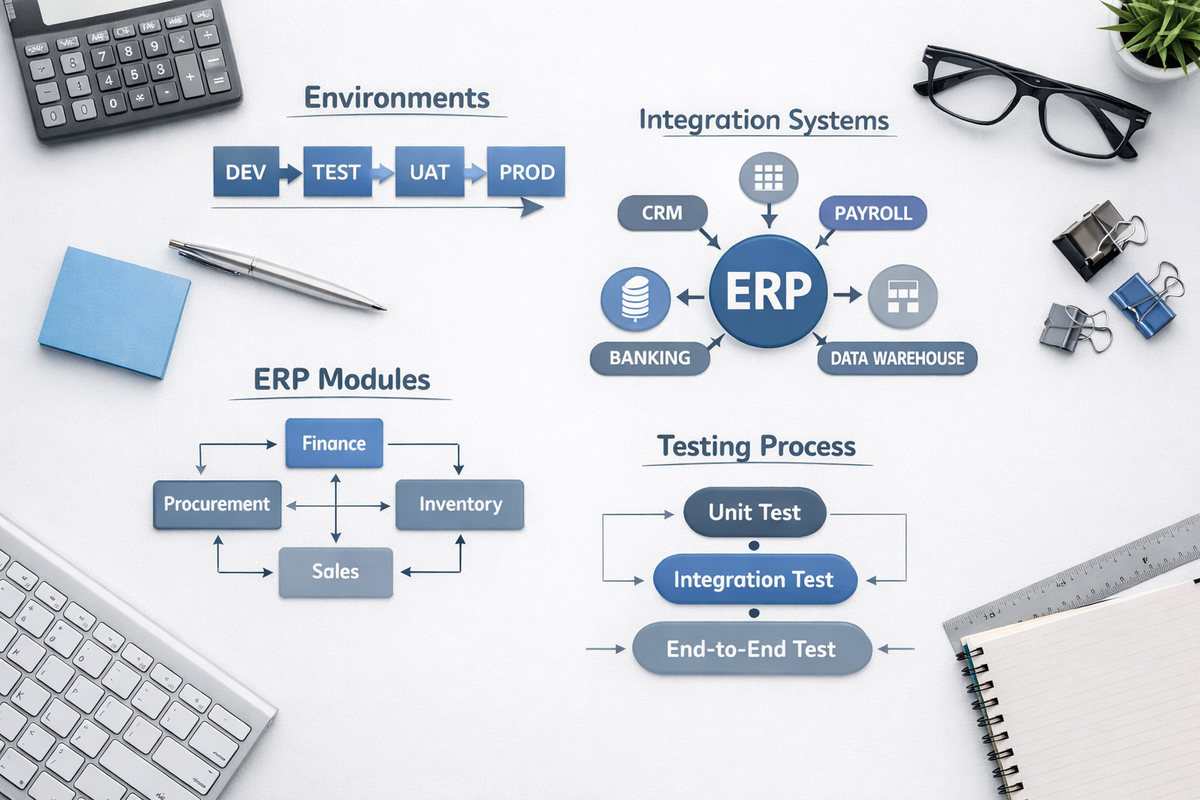
ERP systems are structured around functional modules — discrete areas of the system that handle specific business processes. In Microsoft Dynamics 365 Finance, the primary modules relevant to finance and operations teams include:
| Module | Core Function |
|---|---|
| General Ledger | Chart of accounts, journals, period close, financial reporting |
| Accounts Payable | Supplier invoices, payment runs, vendor management |
| Accounts Receivable | Customer invoices, collections, cash application |
| Procurement | Purchase orders, approval workflows, goods receipt |
| Project Accounting | Project cost tracking, time and expense, billing |
| Inventory Management | Stock control, warehouse, cost of goods |
| Fixed Assets | Asset register, depreciation, disposal |
Each module has its own configuration, data model, and logic. But modules are not islands.
The most persistent problems in ERP implementations do not live inside individual modules — they live between them. A purchase order created in Procurement triggers financial commitments in General Ledger and liability accruals in Accounts Payable. A project milestone in Project Accounting affects revenue recognition in the ledger.
If modules are designed in isolation, integration points become failure points. Finance professionals need to understand not just their module, but the data flows crossing module boundaries.
→ See also: ERP Transformation: A Practical Guide for Anyone Involved in an ERP Project
5. Integrations
An ERP is rarely the only system a business operates. It sits within an ecosystem — and managing the connections between systems is where implementations frequently underestimate complexity.
Common integrations in a finance context include:
- CRM systems (customer data, sales orders feeding into AR and revenue recognition)
- Payroll platforms (payroll journals posting to the general ledger)
- Banking portals (bank statement imports, payment file exports)
- Data warehouses and reporting platforms (ERP data flowing into analytics tools)
- Procurement or expense management tools (invoice data, approval workflows)
Each integration involves decisions about direction, frequency, error handling, and data mapping. None of these are purely technical decisions — they have direct business process implications.
Integrations fail silently.
A misconfigured field mapping or a timing mismatch between systems can corrupt data without triggering an obvious error. Finance teams discover the problem weeks later when the trial balance does not reconcile. Integrations require the same rigour in design and testing as core module functionality — yet they are consistently treated as an afterthought until go-live pressure forces the issue.
→ See also: Why a D365 Finance Analytics Project Is Harder Than Your BI Team Expects
6. Environments: DEV / TEST / UAT / PROD
Every properly managed ERP implementation operates across multiple environments — separate instances of the system used for different purposes at different stages of the project. Understanding what each environment is for, and what should not cross its boundary, prevents some of the most common and costly project failures.
| Environment | Purpose and Governance |
|---|---|
| DEV (Development) | Where developers configure, customise, and build. Not a stable environment — it changes constantly. Finance teams should not test here. |
| TEST | Where the project team validates that builds work as designed before releasing to business users. Typically managed by the implementation team. |
| UAT (User Acceptance Testing) | Where the business validates that the system meets its requirements. This is a formal governance stage, not an informal review. UAT sign-off should be documented. |
| PROD (Production) | The live system. Changes to PROD should only happen through a controlled change management process — never directly, and never experimentally. |
Treating environments as purely technical layers — rather than governance stages — leads to one of two problems. Either testing happens in the wrong environment (finance users testing in DEV, where configurations shift daily), or changes bypass the environment chain entirely and go straight to PROD. Both approaches undermine confidence in the system and make defect tracing nearly impossible.
Each environment transition — from TEST to UAT, from UAT to PROD — should be a deliberate, documented event. Not a file copy. A decision.
→ See also: ERP Go-Live: The 5 Questions Every Sponsor Must Ask Before Approval
7. Unit Testing
Unit testing validates that individual components of the system work in isolation. A developer builds a customised approval workflow, then tests that the workflow triggers correctly under defined conditions. That is a unit test.
Unit testing is primarily a developer responsibility. Finance teams are not expected to design or execute unit tests. But they need to understand the critical limitation:
Passing unit tests does not mean the system works.
It means individual components behave correctly in isolation. A workflow that triggers perfectly can still fail when it interacts with a data model that was configured differently in a later sprint. Unit testing is necessary but not sufficient — it sets the baseline from which real testing begins.
Finance and project managers should not treat a confirmed unit test pass as evidence of system readiness. It is evidence of component readiness. The distinction matters enormously when making decisions about UAT entry and go-live timing.
8. Integration Testing
Integration testing validates that separate components — modules, systems, and data flows — work correctly when connected. This is where testing begins to reflect real-world complexity, and where the majority of meaningful defects appear.
In a finance context, integration testing would validate scenarios such as:
- A purchase order approved in Procurement correctly creates a commitment in General Ledger
- A supplier invoice matched in Accounts Payable correctly posts to the right cost centre and period
- A bank statement imported via integration correctly reconciles to posted payment transactions
Most of the defects that reach production are integration defects.
They were not caught because integration testing was under-resourced, compressed, or treated as a formality rather than a genuine validation gate. If your project plan allocates one week for integration testing, that is a risk, not a schedule.
Finance professionals should be involved in defining integration test scenarios. They understand the business processes well enough to design tests that reflect actual transaction flows — not just technically valid, but operationally meaningful.
→ See also: Why ERP Projects Lose Control While Dashboards Stay Green
9. End-to-End Testing (E2E)
End-to-end testing validates complete business processes from initiation to financial output. Unlike unit or integration testing, E2E testing does not isolate components — it simulates exactly how the business will operate in production.
Three process threads that many finance-oriented ERP implementation test end-to-end are:
| Process | What E2E Testing Validates |
|---|---|
| Procure-to-Pay (P2P) | Purchase requisition → PO approval → goods receipt → supplier invoice → payment run → bank reconciliation → GL posting |
| Order-to-Cash (O2C) | Sales order → fulfilment → customer invoice → cash collection → AR ageing → revenue posting → GL reconciliation |
| Record-to-Report (R2R) | Period journals → accruals → prepayments → intercompany → trial balance → management accounts → statutory close |
E2E testing should use realistic data volumes and real business scenarios — not simplified test cases designed to pass. The goal is to stress the system in the way the business will actually stress it from day one.
Weak E2E testing has a direct causal relationship with production issues.
When businesses go live without completing meaningful end-to-end testing, they discover the gaps during their first real month-end close — at exactly the moment when the finance team has no margin for error. The cost of finding a defect in E2E testing is a fraction of the cost of finding it in production.
→ See also: ERP Go-Live: The 5 Questions Every Sponsor Must Ask Before Approval
10. Data — The Hidden Foundation
Of all the concepts in this article, data is the one most consistently underestimated. It is also the one most consistently responsible for ERP failures.
ERP data exists in three categories, each with different implications:
| Data Type | Description and Risk |
|---|---|
| Master Data | The reference data the system runs on: chart of accounts, cost centres, suppliers, customers, items. If master data is poorly structured or inconsistent, every transaction built on top of it inherits that problem. |
| Transactional Data | The day-to-day operational records: purchase orders, invoices, journals, payments. Errors in transactional data compound over time and become progressively harder to correct. |
| Historical Data | Data migrated from legacy systems to support reporting continuity and opening balances. The most common source of underestimated migration effort. |
The majority of ERP failures are, at their root, data failures.
The system works. The data does not. Supplier records with missing payment terms. Cost centres that do not align with the management reporting structure. Opening balances that do not reconcile to the legacy system. Historical data migrated without validation.
Data migration and data quality management are not technical workstreams that run quietly in the background — they are strategic programme risks that deserve ownership at the senior finance level.
Finance leaders should insist on three things:
- A documented data migration strategy, agreed before design begins
- Formal data quality assessment of source systems, with a remediation plan
- Reconciliation sign-off at each migration cycle — not just the final one
→ See also: Why a D365 Finance Analytics Project Is Harder Than Your BI Team Expects
Final Thought
These ten concepts are not independent topics. They form a system.
Requirements anchor design. Design documents drive development. Modules and integrations define the scope of testing. Environments govern how safely that testing happens. And all of it sits on data — which either enables a successful go-live or undermines one.
Finance professionals who understand how these elements connect are not just better ERP users. They are better project partners, better governance owners, and better positioned to protect their organisations from the failures that are entirely predictable — and entirely avoidable.
The teams that deliver successful ERP implementations are not the ones with the best software. They are the ones who understood these fundamentals before they started.
Continue Exploring
Why 80% of Dynamics 365 Finance Implementations Fail https://www.fitgapfinance.com/why-dynamics-365-finance-implementations-fail/
ERP Go-Live: The 5 Questions Every Sponsor Must Ask Before Approval https://www.fitgapfinance.com/erp-go-live-readiness-sponsor-questions/
Why ERP Projects Lose Control While Dashboards Stay Green https://www.fitgapfinance.com/erp-projects-lose-control-dashboards-green/
ERP Transformation: A Practical Guide for Anyone Involved in an ERP Project https://www.fitgapfinance.com/erp-transformation-practical-guide/
Why a D365 Finance Analytics Project Is Harder Than Your BI Team Expects https://www.fitgapfinance.com/d365-finance-analytics-project-complexity/
The Silent Failure Mode of ERP Projects: Decision Paralysis https://www.fitgapfinance.com/erp-decision-paralysis-silent-failure/
🇫🇷 Version française : https://www.fitgapfinance.com/concepts-erp-fondamentaux-debutants/